
Move your setup to another device
Before switching, identify a compatible player on the new device and confirm account connection rules. Stop playback on the old screen, then use the issued login.
Read more →
ACCOUNT SUPPORT
Find the account, order and setup information that makes a support conversation useful.
GUIDES & NEXT STEPS
Before switching, identify a compatible player on the new device and confirm account connection rules. Stop playback on the old screen, then use the issued login.
Read more →Compatibility begins with the exact model, operating system and app store. Find those details in device information, then confirm the publisher and requirements.
Read more →Contact WhatsApp +44 7532 814802 or [email protected]. Begin with the order reference if available, the exact symptom and the device and player. Include the.
Read more →
Find the delivery message associated with the order, including spam or archived conversations where relevant. Identify whether it contains a private playlist,.
Read more →Begin with favourites and category filters instead of deleting source entries. Keep a small everyday list and preserve full channel names when regional editions.
Read more →Read the full refund policy and identify the payment date, purchase type and reference. The supplied Hot IPTV policy gives eligible first-time subscriptions a.
Read more →Contact support before expiry with the existing reference and desired term. Confirm whether renewal extends the same login and from which date. After the agreed.
Read more →
Record what still works: whether the app opens, playlist loads and another programme plays. For a second-device comparison, stop playback on the first and.
Read more →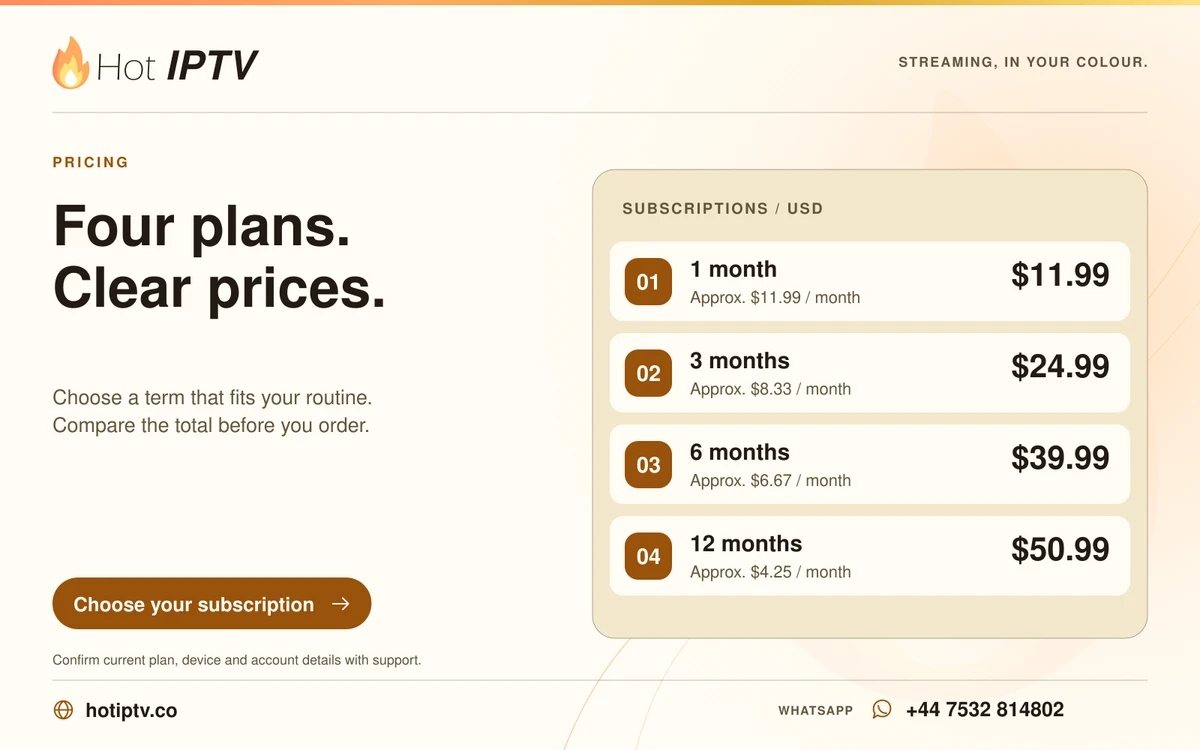
Request the receipt for a specific order using its reference, date, amount and currency. Provide purchase contact information needed to locate it. For a player.
Read more →
Save the private playlist or credentials in a protected record, not a public note or screenshot. Include context identifying order, player and format. A backup.
Read more →Use the installed app’s official store or verified publisher for updates. Keep a private account record and any supported favourites backup before major changes..
Read more →Compare package, term, total and currency with the written conversation. Confirm connections, activation and separate app charges before payment. The Hot IPTV.
Read more →LET’S GET YOU STARTED
Install a suitable player, then WhatsApp us for your 24-hour trial.